
SSO ID Merge Rajasthan: How to Link Multiple SSO IDs (Step-by-Step Guide)
If you have created more than one account on the Rajasthan SSO portal, you may face confusion while logging in or accessing services. Many users forget their original account and create a new one, which leads to multiple IDs for the same person.
To solve this issue, the SSO ID Merge Rajasthan process helps you link multiple accounts into a single ID. This makes account management easier and allows you to access all government services from one login.
In this guide, you will learn how to merge SSO IDs, when to do it, and important precautions to avoid mistakes.
What is SSO ID Merge in Rajasthan?
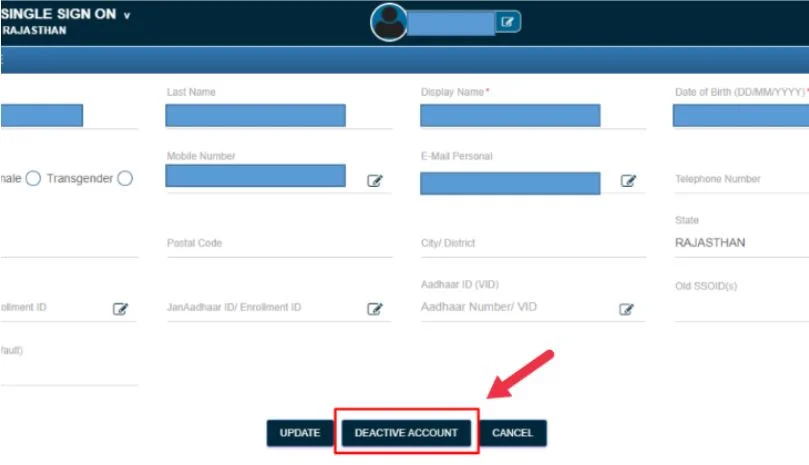
SSO ID merge is the process of combining multiple SSO accounts into one primary account. Instead of managing different logins, users can link their accounts and use a single ID for all services.
This is part of digital identity management, which ensures:
- one user = one account
- better security
- simplified access
Read Also: Recover SSO ID Rajasthan: Forgot ID & Username Guide (2026)
Why Do Users Have Multiple SSO IDs?
Many users accidentally create multiple SSO IDs due to:
- Forgetting login credentials
- Using different mobile numbers
- Registering again for different schemes
- Not remembering previous accounts
👉 This creates confusion and login issues
When Should You Merge SSO IDs?
You should consider SSO ID Merge Rajasthan if:
- You have more than one SSO account
- You want to avoid switching accounts
- Your services are divided across IDs
- You want a single login system
Important Things to Know Before Merging
Before you start, keep these points in mind:
- Only accounts belonging to the same person can be merged
- Your mobile number must be active
- OTP verification is required
- One account will remain active (primary ID)
- Other accounts may be deactivated
👉 Always choose your main account carefully
How to Merge SSO ID Rajasthan (Step-by-Step)
Follow these steps:
Read Also: SSO ID Login Error Today – 100% Working Solution for All Users 2026
Login to SSO Portal
Use your existing SSO ID to log in.
Open Profile Settings
Go to your account dashboard.
Click on Edit Profile
Find account management options.
Select Deactivate Account
Start the merging process.
Confirm Deactivation
Click “Yes” on confirmation page.
Verify OTP
Enter OTP sent to your registered mobile number.
Link Another Account
Enter username and password of the second account.
Complete Merge
Submit details and confirm linking.
👉 After this, both accounts will be connected under one ID
What Happens After SSO ID Merge?
After completing the process:
- One account becomes your primary ID
- Other account is deactivated
- Services are linked to one account
- You can access everything with one login
👉 This improves user experience
Benefits of SSO ID Merge Rajasthan
Merging accounts provides several advantages:
- Single login for all services
- No need to remember multiple IDs
- Faster access to services
- Better account management
- Improved security
- Organized digital identity
Common Problems During SSO ID Merge
OTP Not Received
- Check mobile network
- Try again
Incorrect Credentials
- Enter correct username/password
Account Not Linking
- Ensure both accounts belong to you
Server Error
- Try after some time
Read Also: Jan Soochna Portal Rajasthan: Check & Apply Government Schemes Online (2026 Guide)
Can You Undo SSO ID Merge?
No, in most cases, SSO ID merge cannot be reversed. Once accounts are merged and one is deactivated, you cannot separate them again.
👉 Always double-check before merging
Is SSO ID Merge Safe?
Yes, the process is secure because it uses:
- OTP verification
- identity authentication
- secure login system
👉 Your data remains protected
SSO Helpdesk Support
If you face any issue, you can contact the official support:
📞 SSO Helpdesk Number: 1800-180-6127
They can help with:
- account merge issues
- login problems
- recovery support
Conclusion
The SSO ID Merge Rajasthan process is a simple and effective way to manage multiple accounts. By merging your SSO IDs, you can avoid confusion, improve security, and access all services using one login.
Before starting, make sure you understand the process and choose the correct primary account. Once merged, your digital experience becomes much smoother and more organized.
FAQs
Is SSO ID merge safe?
Yes, it is safe and uses OTP verification for security.
What happens after merging SSO IDs?
One account remains active, and all services are linked to it.
Which account remains after merging?
The primary account you choose remains active.
Can I merge two SSO IDs?
Yes, if both accounts belong to the same person.
Is SSO ID merge available online?
Yes, it can be done through the SSO portal.
Can I merge more than two accounts?
Usually, you can merge multiple accounts step by step.