
How to Register SSO ID Without Aadhaar or Jan Aadhaar in Rajasthan (2026 Guide)
If you want to create an SSO ID but don’t have Aadhaar or Jan Aadhaar, you might think registration is impossible. However, the good news is that you can still register SSO ID without Aadhaar Rajasthan using alternative methods like Google account, Bhamashah ID, or SIPF ID.
In this complete guide, you will learn how to create SSO ID without Aadhaar or Jan Aadhaar, which method is best, and how to avoid common registration problems.
Can You Register SSO ID Without Aadhaar or Jan Aadhaar?
Yes, you can register an SSO ID in Rajasthan without Aadhaar or Jan Aadhaar by using alternative options such as a Google account, Bhamashah ID, SIPF ID, or Udyog ID. These methods allow users to create an account and access government services without needing Aadhaar initially.
Why Aadhaar or Jan Aadhaar is Usually Required?
Aadhaar and Jan Aadhaar are commonly used for:
- identity verification
- linking bank accounts
- accessing government schemes
- ensuring secure authentication
These IDs help the government deliver benefits directly and reduce fraud.
Best Ways to Register SSO ID Without Aadhaar Rajasthan
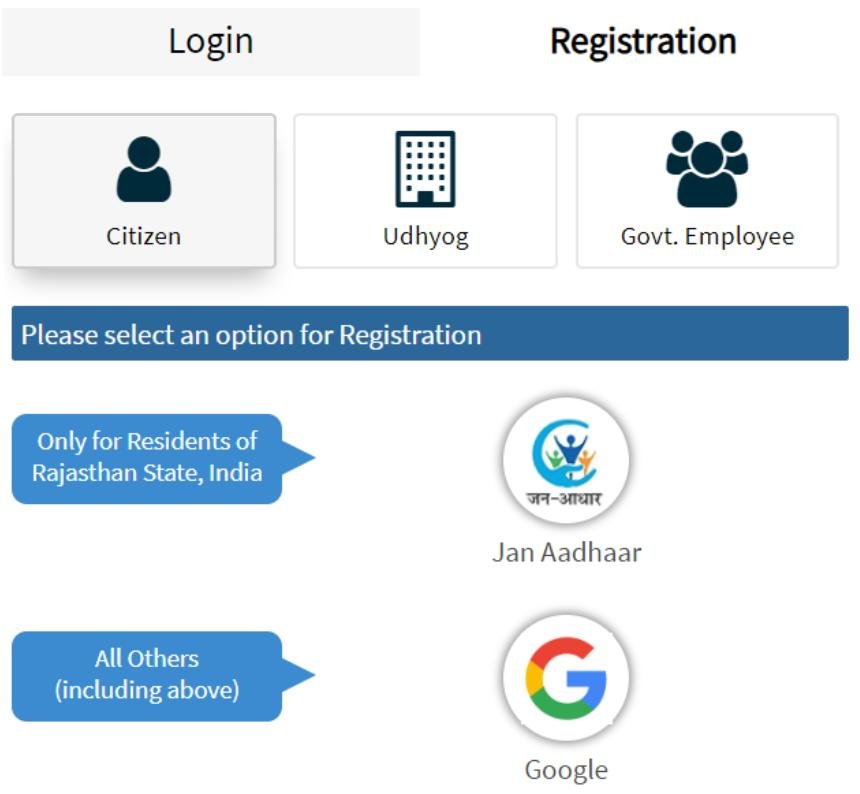
If you don’t have Aadhaar, you can use the following methods:
Read Also: SSO ID Login Rajasthan 2026 Complete Guide
Google Account (Recommended )
- easiest method
- fast registration
- no documents required
Bhamashah ID
- useful for Rajasthan residents
- requires family ID details
SIPF ID (Government Employees)
- for employees only
- secure login system
Udyog ID (Businesses)
- for business registration
- used by entrepreneurs
Comparison – Which Method is Best?
| Method | Ease of Use | Required Info | Best For |
|---|---|---|---|
| Very Easy | Email login | Everyone | |
| Bhamashah | Medium | Family details | Residents |
| SIPF | Easy | Employee ID | Govt employees |
| Udyog | Medium | Business details | Business owners |
👉 Google login is best for most users
How to Register SSO ID Without Aadhaar (Step-by-Step)
Quick Steps (Snippet Ready)
- Visit SSO Rajasthan official website
- Click on “Register”
- Choose “Google” or other method
- Sign in with your selected option
- Fill required details
- Submit and create your SSO ID
Can You Add Aadhaar Later?
Yes, after creating your account, you can link Aadhaar or Jan Aadhaar later from your profile settings.
👉 This helps unlock:
- more government schemes
- full account verification
- better service access
Limitations Without Aadhaar
If you use SSO ID without Aadhaar Rajasthan, you may face:
- limited access to some schemes
- restricted verification features
- fewer benefits
👉 Linking Aadhaar later is recommended
Read Also: SSO ID Rajasthan: Login, Registration & Password Reset Guide 2026
Common Problems and Solutions
Registration Not Working
- Try Google login
- check internet connection
Options Not Showing
- use desktop browser
Login Issues
- verify credentials
- reset password
Real-Life Example
For example, a student without Aadhaar can still register using a Google account and access basic services. Later, they can add Aadhaar to apply for scholarships and government benefits.
Is It Safe to Register Without Aadhaar?
Yes, the SSO system is secure and uses:
- authentication protocols
- secure login systems
- identity verification methods
👉 Your data remains protected
Conclusion
Creating an SSO ID without Aadhaar Rajasthan is simple if you use the right method. Whether you choose Google login, Bhamashah ID, or another option, you can easily register and start using government services.
However, for full benefits and access to all schemes, it is recommended to link Aadhaar or Jan Aadhaar later. This ensures a smooth and complete digital experience on the Rajasthan SSO portal.
FAQs
Which method is best without Aadhaar?
Google login is the easiest and fastest.
Is Aadhaar mandatory later?
Not mandatory, but recommended for full access.
Can I update Aadhaar later?
Yes, you can link it from your profile.
How to create SSO ID in Rajasthan?
To create an SSO ID in Rajasthan, visit the official SSO portal, click on “Register,” choose a method (Aadhaar, Jan Aadhaar, Google, or others), enter your details, verify with OTP if required, and submit the form to generate your SSO ID.