
SSO ID Registration 2026 Process for Rajasthan SSO Portal Login
If you want fast and secure access to Rajasthan government services, completing SSO ID Registration is essential. The Rajasthan Single Sign-On system, operated by the Government of Rajasthan, allows users to access more than 100 digital services with a single login.
Updated for 2026: This guide includes the latest process improvements, security updates, and registration requirements.
What is SSO ID Registration
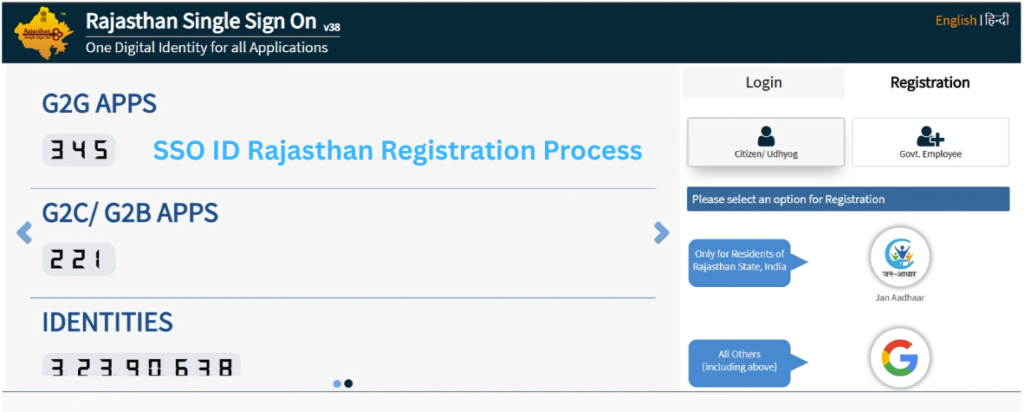
SSO ID Registration Rajasthan is the process of creating a verified Single Sign-On account on the official Rajasthan SSO portal. Once registered, users can log in to multiple government departments using one secure username and password.
Instead of managing different accounts for various services, the Rajasthan SSO system centralizes everything into one dashboard.
With a registered SSO ID, you can access:
- e-Mitra services
- Government recruitment portals
- Scholarship applications
- Pension schemes
- GST & business registration services
- Utility bill payments
This unified system improves efficiency, transparency, and convenience.
Who Can Apply for SSO ID Registration
The online SSO ID registration process is available for three categories:
Citizens
Residents of Rajasthan can register using:
- Jan Aadhaar ID
- Aadhaar card
- Registered mobile number (for OTP verification)
Government Employees
State government employees must register using:
- SIPF Number
- Official employment records
Businesses
Business owners operating in Rajasthan can register using:
- Business Registration Number (BRN)
- Linked mobile number
This structured eligibility system ensures secure access for all user types.
SSO Portal Login
The SSO Portal Login process allows users to access various Rajasthan government services through a single account. By logging in with your SSO ID, password, and captcha code, you can use multiple online services without creating separate accounts for different departments. This makes the portal convenient, time-saving, and easy to use for citizens, students, employees, and businesses.
Steps to Login to SSO Rajasthan Portal
- Visit the official SSO Rajasthan Portal
Open the portal in your browser. - Click on the “Login” option
On the homepage, select the Login button. - Enter your SSO ID
Type your registered SSO ID / Username in the login field. - Enter your password
Carefully enter your account password. - Fill in the captcha code
Enter the captcha code shown on the screen for security verification. - Click on “Login”
After entering all details correctly, click the Login button to access your dashboard.
Once logged in, you can use services related to e-Mitra, job applications, education, government schemes, bill payments, and many other departments from one platform.
Helpful Tip: Always keep your SSO ID and password secure and avoid sharing your login details with anyone.
Documents Required for SSO ID Registration
Before starting your Rajasthan SSO registration, keep these documents ready:
- Jan Aadhaar Number
- Aadhaar Card
- SIPF (for employees)
- BRN (for businesses)
- Active mobile number
- Valid email ID
Important: All details must match official government databases to avoid rejection.
General Overview of SSO ID Registration
SSO ID Registration is the process of creating a Single Sign-On (SSO) account that allows users to access multiple Rajasthan government services with one secure login. The system is managed by the Government of Rajasthan as part of its digital governance initiative.
Through Rajasthan SSO registration, citizens, government employees, and businesses can log in to various departments without creating separate accounts for each service. This unified platform simplifies access, improves transparency, and saves time.
After completing the online SSO ID registration, users receive a unique username and password. This login provides access to services such as:
- e-Mitra services
- Government recruitment portals
- Scholarship applications
- Pension schemes
- GST and business-related services
- Utility bill payments
The registration process typically requires Jan Aadhaar, Aadhaar, SIPF (for employees), or BRN (for businesses), along with OTP verification through a registered mobile number.
Overall, SSO ID Registration Rajasthan acts as a centralized digital gateway, ensuring secure, efficient, and paperless access to more than 100 state government services.
How to Register for SSO ID Rajasthan
Follow this updated 2026 registration process:
Visit the Official Rajasthan SSO Portal
Open the official website in a secure browser.
Click on “Registration”
Select User Category
Choose:
- Citizen
- Government Employee
- Business
Enter Identification Details
Provide Jan Aadhaar, Aadhaar, SIPF, or BRN as required.
OTP Verification
Enter the OTP sent to your registered mobile number.
Create Username & Password
Choose a strong and unique password.
Submit & Activate
After verification, your SSO ID registration will be successfully completed.
You can now use your SSO ID login Rajasthan credentials to access all services.
How to Login After SSO ID Registration
After completing registration:
- Visit the SSO login page
- Enter Username
- Enter Password
- Fill Captcha
- Click Login
The system will redirect you to your personalized dashboard.
The portal uses encrypted sessions and OTP-based authentication for security.
Key Benefits of SSO ID Registration Rajasthan
Here are the major updated benefits:
✔ Single login access to 100+ services
✔ Time-saving and paperless governance
✔ 24/7 online accessibility
✔ Transparent real-time tracking
✔ Secure OTP verification system
✔ Role-based personalized dashboard
✔ Reduced paperwork and faster approvals
The Rajasthan SSO portal continues to improve its digital infrastructure in 2026 to enhance user experience.
Common Problems During SSO ID Registration
OTP Not Received
✔ Ensure your mobile number is linked with Jan Aadhaar or Aadhaar.
Incorrect Details Error
✔ Cross-check your government records before entering data.
Forgot Password
✔ Use the “Forgot Password” option for secure recovery.
Multiple SSO IDs Created
✔ Contact the SSO helpdesk to merge duplicate accounts.
Conclusion
Completing your SSO ID Registration Rajasthan is no longer optional—it is a necessity for accessing state services efficiently. The Rajasthan SSO portal continues to evolve with improved security, faster login speeds, and expanded service coverage in 2026.
If you have not created your SSO ID yet, now is the right time to register and benefit from seamless digital governance.
FAQs
Is SSO ID Registration Free?
Yes, Rajasthan SSO ID registration is completely free of cost.
Can I Register Without Jan Aadhaar?
Yes, Aadhaar or category-specific credentials can be used depending on eligibility.
How Long Does SSO Registration Take?
The process usually takes 5–10 minutes if all documents are ready.
How Many Services Are Available?
More than 100 Rajasthan government services are accessible through SSO login.